
To help us manage and optimize your Google Business Profile, please add team@bridgefractional.com as a Manager.
Adding us as a Manager allows our team to update business information, manage photos, respond to reviews, and help keep your profile optimized without giving us ownership of your business listing.
The process usually only takes a few minutes.
1. Sign in to Google
Go to business.google.com and make sure you’re signed in to the Google account that owns or manages your Google Business Profile.
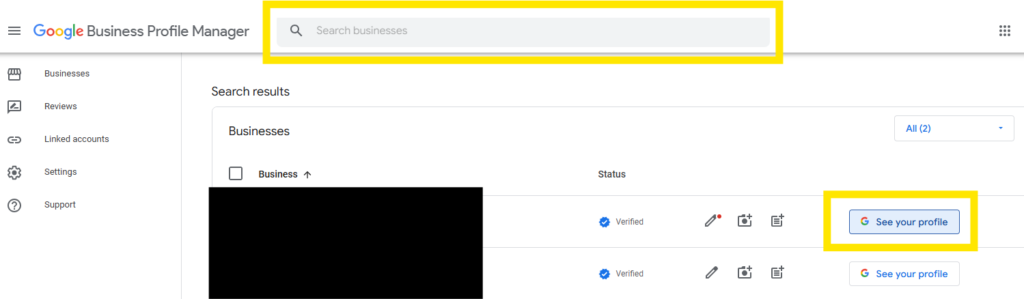
2. Find Your Business Profile
If you manage multiple businesses, search Google for the exact name of the business you want to give us access to.
If multiple businesses appear, click See Profile for the correct business.
3. Open Your Business Profile Menu
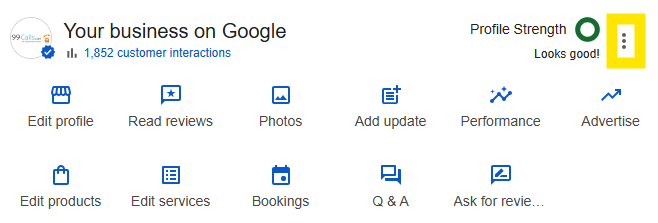
Once you’ve selected your business, Google will display the Business Profile management options directly within Google Search.
Look for the three vertical dots (⋮) on the right side of the Business Profile menu and click them.
4. Open Business Profile Settings
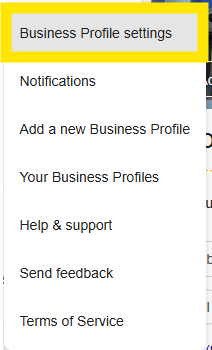
From the dropdown menu, click:
Business Profile settings
5. Select “People and Access”
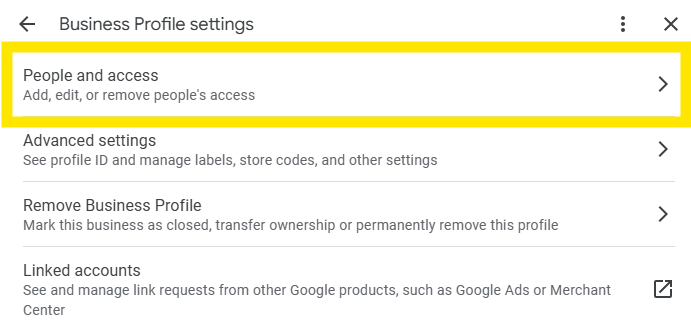
In the Business Profile settings window, click:
People and access
This section controls who is allowed to manage your Google Business Profile.
6. Click “Add”
In the upper-right corner of the People and access window, click the blue Add button.
7. Add Bridge Fractional
Enter the following email address:
Double-check the spelling before continuing.
8. Select “Manager”
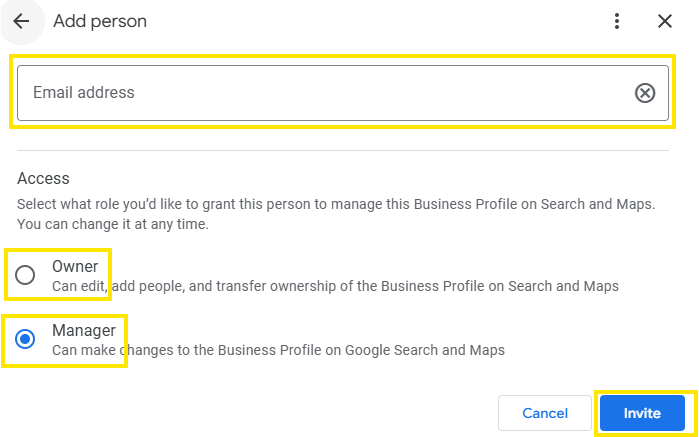
Google will ask which level of access you’d like to provide.
Select:
Manager
Manager access allows our team to help manage your Business Profile while keeping ownership and higher-level account controls with you.
You do not need to transfer ownership of your Google Business Profile to Bridge Fractional.
9. Send the Invitation
Click Invite.
Google will send an invitation to team@bridgefractional.com. Our team will accept the invitation and confirm access.
You’re Done
Once you’ve sent the invitation, you can return to your Bridge onboarding checklist and mark the Google Business Profile Access step as complete.
If you have trouble finding your Business Profile or don’t see the People and access option, contact your Bridge Fractional account manager and we’ll help you determine which Google account currently has access.