
To help us manage and optimize your Google Ads campaigns, please add team@bridgefractional.com as a user on your Google Ads account.
1. Sign In to Google Ads
Go to ads.google.com and sign in using the Google account that has administrative access to your Google Ads account.
If you manage multiple Google Ads accounts, make sure you select the correct account before continuing.
2. Open Access and Security
Once you’re inside the correct Google Ads account:
- Click Admin in the left-hand menu.
- Select Access and security.
Depending on your Google Ads interface, you may also see this option under the Tools or Admin menu.
3. Add a New User
On the Users tab:
- Click the + button to add a new user.
- Enter the following email address:
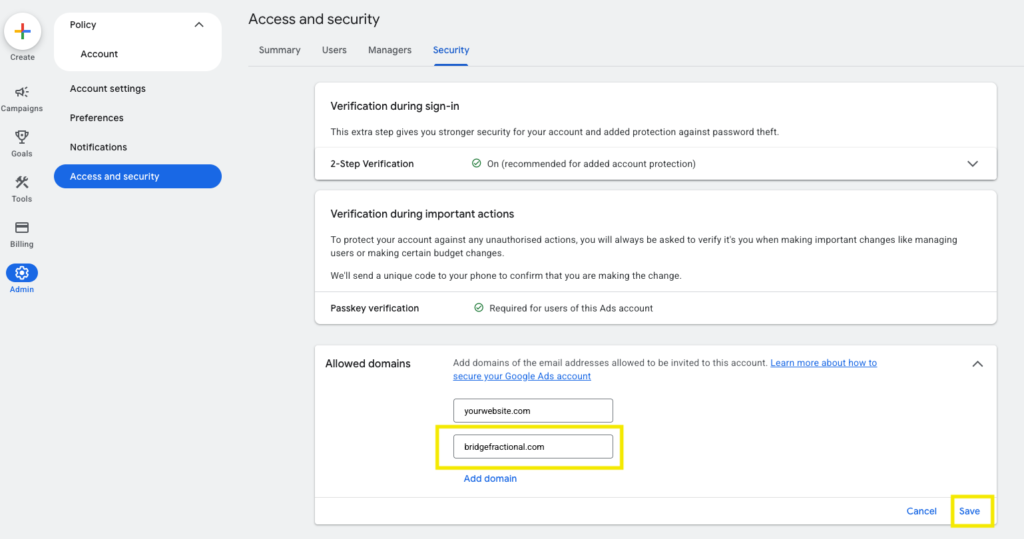
You may need to add our domain: bridgefractional.com to your list of allowed domains. You can do this in your Security Settings.
4. Select the Access Level
Select Standard access.
Standard access allows our team to manage campaigns, ads, keywords, budgets, reporting, and other day-to-day Google Ads activities without giving us control over account ownership or other administrative users.
If we specifically request Admin access for an account setup, billing, linking, or permissions issue, you can update the access level later.
5. Send the Invitation
Click Send invitation.
Google will send an invitation to team@bridgefractional.com. Once our team accepts it, we’ll be able to access the account and begin managing your campaigns.
Having Trouble Adding Us?
Only users with sufficient administrative permissions can add or manage other users in Google Ads.
If you don’t see Access and security, or the option to add a user is unavailable, you may need to ask the current account administrator to add: